
Introduction
What is Netflow
Netflow is a data integration tool similar to ETL/ELT tools. It offers a wide range of existing connectors and transformations that allow creating a production ready data pipelines.
It’s main features are:
customisability and adaptability creating data pipelines
built in automatic scheduling
auditing and logging
user input through custom form inputs
support for python scripting and ML models
Netflow is usually used for following scenarios:
Creating and populating (automatically) data warehouses from various data sources.
User data annotation before importing to data warehouse. For example, it can happen that some metadata about results stored in csv file is missing. Using Netflow users can add metadata like Project, Task, Experiment,… before it is stored to database.
Creating user workflows that connects to external APIs which creates reports, perform ML analysis,…
Usage of python scripts and ML models in various data pipelines.
Basic terminology
Netflow has various features and use cases but it consists of simple building blocks which are used to create practically all of its functionality. Those building blocks are:
Node: A single data connector, transformation and in general a function that takes some data as input and returns some data as output.
Process: A group of nodes connected in a connected pipeline. All nodes in a process are executed in a specific order. If a node is a function that do something on a data, process is a complete data pipeline that performs some use case.
Instance: A single execution of a process. Each instance has its own data and metadata that were used when the process was executed. Instance is always triggered by an user or automatic scheduler.
Form: A group of inputs like text, dropdown menus, tables, date inputs,… that user can fill in during instance execution. That data is then stored in instance metadata and can be used as an input for other nodes.

It is important that you understand this terminology because it will be used across entire documentation and tutorials. Additional terms will come along the way but those above are the most important.
Application structure
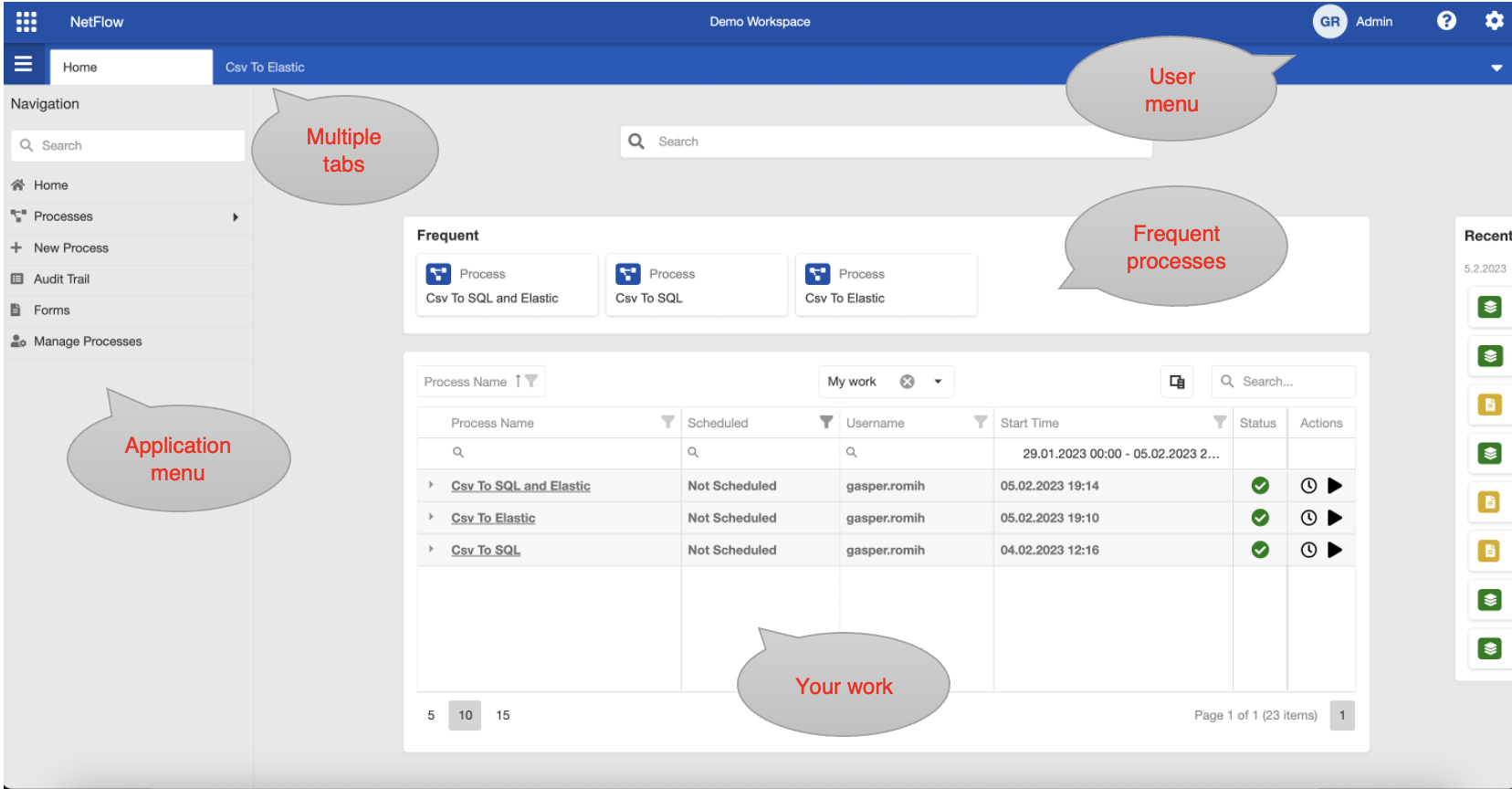
Netflow home page.
Application home page consists of:
Navigation menu: Here you can find all processes and forms as well as some other pages like audit trail and process manager and designer.
Tabs: Application consists of multiple tabs. Each different page and process is opened in different tab and has its own content. You can easily navigate between tabs.
Frequent & My Work: Here you can find your most frequently executed processes and a table indicating the work you have done inside application.